




Making the Right Call: Raspberry Pi or Arduino UNO R4 WiFi for Your Next Project?
- Charles Koduru
- Jul 26, 2023
- 3 min read

Updated: Jul 26, 2023
By Charles Koduru
In the realm of DIY electronics and tinkering, two names stand tall - Raspberry Pi and Arduino. Both are powerful, compact devices that have captured the hearts of tech enthusiasts, hobbyists, and even professionals. Despite many opting for the Pi due to its Wi-Fi support, the question arises: will the introduction of the new Arduino R4 WiFi board alter this trend? In this blog post, we'll explore the strengths and weaknesses of both Raspberry Pi and Arduino R4 WiFi to help you make an informed decision based on your project requirements.
Raspberry Pi or Arduino R4 WiFi, neither I am a programmer.
Raspberry Pi Zero

Raspberry Pi is a single-board computer renowned for its versatility and wide range of applications. Equipped with a powerful ARM processor, ample RAM, and various connectivity options, it can handle tasks ranging from simple DIY projects to complex IoT applications. With its full-fledged operating system support (Raspbian OS), Raspberry Pi can run a variety of programming languages and software, making it an excellent choice for those seeking flexibility and ease of use. Whether you want to build a media center, a home automation system, or a retro gaming console, Raspberry Pi has got you covered.

Applications
Using Raspberry Pi, you can create various projects such as a Home Automation System, Media Center, Retro Gaming Console, Weather Station, Network-Attached Storage (NAS), Pi Hole (Network-wide Ad Blocker), Security Camera System, PiVPN (Virtual Private Network), Home Assistant, Magic Mirror, Internet Radio, Home Arcade Machine, Educational Projects, Remote Desktop, and Pi-based Cluster Computing.
Arduino UNO R4 WiFi

The Arduino platform is primarily designed for embedded projects and electronics prototyping. Its strength lies in simplicity and real-time processing capabilities, making it ideal for projects that require precise control over sensors, actuators, and other electronic components. The Arduino IDE offers a user-friendly programming environment using a C-like language, particularly well-suited for beginners or those with basic programming knowledge. In addition to this, the Arduino UNO R4 WiFi brings together the power of the RA4M1 microcontroller from Renesas, featuring exciting new peripherals, with the wireless connectivity capabilities of the ESP32-S3 from Espressif. With the UNO R4 WiFi, you gain the advantage of wireless connectivity, allowing easy project upgrades and extending the reach of your current setup. It's a perfect choice for both beginners and experienced makers seeking to fuel their creativity. The board's onboard 12x8 LED matrix, Qwiic connector, VRTC, and OFF pin cater to all potential needs that makers may have for their next project.
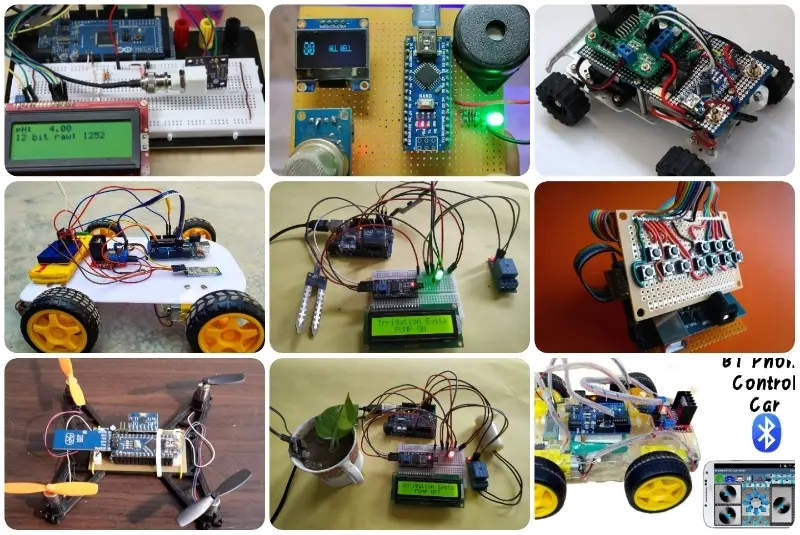
Applications
Home Automation System, IoT Device Control and Monitoring, Smart Home Security System
Weather Station with Online Data Reporting, Wireless Sensor Network, Remote Control for Appliances and Devices, WiFi-Enabled Robot or RC Vehicle, Internet-Connected Smart Garden, Wireless Data Logging and Monitoring, and WiFi-Controlled LED Lighting System.
These applications leverage the WiFi capabilities of the Arduino to enable wireless communication, making them suitable for various home automation, IoT, and remote control projects.
How is the Arduino R4 WiFi different from a regular Arduino uno with a wifi module?
The R4 has more processing power and can handle data more effectively
If the issue is WiFi, can I use a Raspberry Pi Zero instead of the Arduino R4?
Due to the R4 product inventory and user-friendly IDE, the R4 board can
offer greater adaptability than the Pi Zero.
Which is easier to use?
The Arduino IDE is easier to use, but requires more steps to connect to WiFi.
On the other hand, a Pi with an OS is easier to connect to WiFi, but uses Thonny as its basic IDE.
Raspberry Pi Zero | Arduino UNO R4 WiFi |
1GHz BCM2835 single-core | Renesas RA4M1 (Arm® Cortex®-M4) @ 48 MHz |
2.4 GHz WiFi | 2.4 GHz WiFi |
Bluethooth 4.0 | Bluethooth 5.0 |
Mirco USB Ports, HDMI, Camera Ports | |
Supports OS (via micro SD card) | |
5V | USB Micro B | 40 GPIO Pins | | 6V - 24V | USB C | 28 Pins |
Hardware Attached on Top (Shield System) | Shield System ( HAT) |
1 Built in LED | Built in 12 x 8 LED Matrix |
Budget Friendly and Limited Stock | Expensive and In-Stock |
Choosing the Right One
The choice between Raspberry Pi and Arduino R4 WiFi ultimately depends on the specific requirements of your project. If you need a versatile and powerful platform for running applications and connecting to the internet, Raspberry Pi is the way to go. However, if you're looking for a lightweight, power-efficient solution for embedded systems and robotics, Arduino R4 WiFi is an excellent option. My typical preference is Raspberry Pi due to its ease of connecting to WiFi, enabling fast and reliable wireless data transmission. However, the new R4 board has made smaller data transmission setups more dependable, opening up additional possibilities for wireless projects.
In conclusion, both Raspberry Pi and Arduino R4 WiFi have their unique strengths, and neither is objectively "better" than the other. Instead, it comes down to your project needs, complexity, and personal preference. Whichever path you choose, rest assured that you'll be stepping into the exciting world of DIY electronics and unlocking endless possibilities for innovation and creativity. Remember, the key to success lies in experimentation and hands-on experience, so dive in, explore, and let your imagination run wild with either Raspberry Pi or Arduino R4 WiFi! Happy tinkering!
Comments